
First way
They commented you. If you press their name under the comment it will direct you to their Blogger profile page.
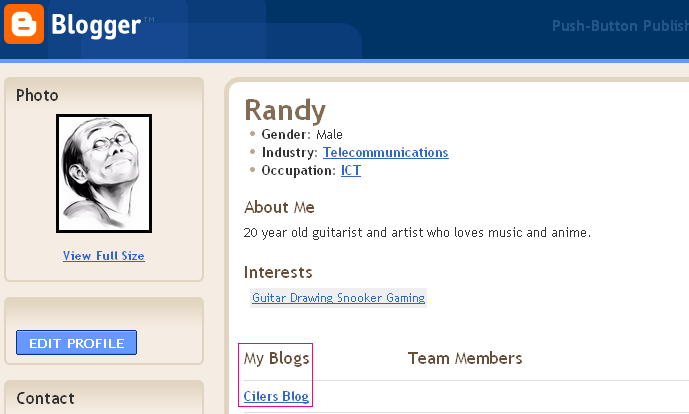
You now see "My Blogs" and then just click the blue link.
Easy as that.
Second way

Well for that just press on the persons icon and there should pop up a new window in the middle of the screen.
It should look like this:

If the person has set up everything you should see that persons Link to his/her blog. Some I noticed wrote also it in their About me.
Now you did like I said but you don't see any link there neither is there one written under about me.
If you are one of those persons Who hasn't set those up then now I try to teach what you should do.
As I registred with gmail I figured out this much that you have to change these settings under gmail.
First go to your blogger settings menu where you cuztomise your blog.
You should find from the top right a menu like this:

Press "My Account"
This should lead to gmail or google accounts and the page should look like this:

Now just press "Edit Profile" what will lead you to a new page.
There you can edit what you want. One thing is your picture. You can change that if you want.
But the main thing about is to add a link for blogger!

Well do your changes and press "Save changes".
Other changes you want to do you can do under Dashboard and "Edit Profile"
Like before I'm not really the best in explaining stuff. But I hope this will be useful to some people as they had trouble with this. I hope this was the right way. I'm sorry if i was mistaken and all this is worthless.
If you have trouble you can comment and I can try to help and I'm sure other kind people will help too :)


